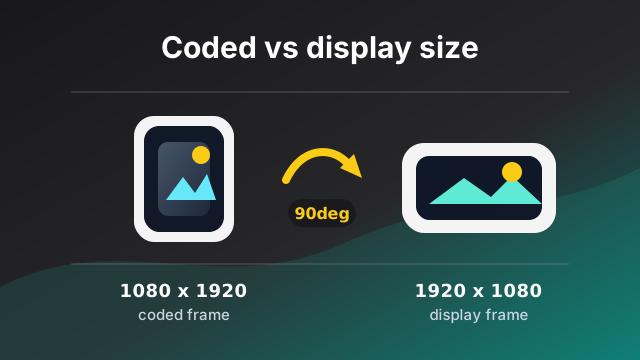
While building vertical video feeds in Expo apps, I expected the annoying parts to be compression, downscaling, bitrate, and upload speed. Those are real problems. The thing I kept coming back to was less dramatic: should this video fill the player, or should we show the whole thing with letterboxing?
In a feed, that answer usually needs to exist before the video is playing. You do not want every cell to mount, ask the player what happened, then shift its layout afterward.
The first version was the obvious one:
function chooseObjectFit(width: number, height: number) {
  if (height > width) {
    return 'cover'
  }
  return 'contain'
}
That check is fine. If those are the dimensions of the video as shown to the user, height > width means portrait.
My mistake was assuming every width and height I had meant that.
Then the logic got a little more careful. Square and near-square videos are easy to crop badly, so only clearly portrait videos used cover; everything else used contain:
function chooseFeedFit(width: number, height: number) {
  const aspectRatio = width / height
  if (height > width && aspectRatio <= 0.8) {
    return 'cover'
  }
  return 'contain'
}
Still fine. But only if width and height are display dimensions.
Where it broke
Some uploads were clearly landscape in the player, but the app treated them like portrait. The stored values seemed to back that up: width 1080, height 1920.
Those values were not coming from the raw file anymore. We were sending videos through an external service to compress and downsample them, then storing the dimensions it reported back. Since that service was already producing the processed asset, it felt natural to trust its width and height too.
But those dimensions did not account for rotation. They described the encoded frame, not the shape the player would show.
That is not unusual. Plenty of video services are built around storage, delivery, and transcoding, not UI layout. Bunny.net is one example I have run into, despite the similar name and no relation to Mediabunny. You may get width and height back, but not rotation, and not the final display dimensions.
So I checked the upload pipeline, the player, the database values, and the threshold. The threshold was not the problem.
The missing piece was rotation metadata.
Video files can store frames one way and tell the player to present them another way. A file can have 1080x1920 coded frames, plus metadata that says to rotate the video 90 degrees for playback.
That gives you two different shapes for the same file:
const video = {
  codedWidth: 1080,
  codedHeight: 1920,
  rotation: 90,
  displayWidth: 1920,
  displayHeight: 1080,
}
If the app reads codedWidth and codedHeight, it sees a portrait frame. If the player applies the rotation, the user sees a landscape video.
So the portrait check was not wrong. I was running it against the pre-rotation dimensions.
Coded size is not display size
The names matter here:
codedWidthandcodedHeighttell you how the frames are encoded.rotationtells you how those frames should be presented.displayWidthanddisplayHeighttell you what shape the user actually sees.
For layout, displayWidth and displayHeight are the values I want. They answer the question the feed actually cares about: what shape will this video be on screen?
So the fit logic becomes:
type VideoDisplayMetadata = {
  displayWidth: number
  displayHeight: number
}

function chooseFeedFit(metadata: VideoDisplayMetadata) {
  const aspectRatio = metadata.displayWidth / metadata.displayHeight
  if (metadata.displayHeight > metadata.displayWidth && aspectRatio <= 0.8) {
    return 'cover'
  }
  return 'contain'
}
The threshold is product-specific. The important part is that the ratio comes from dimensions after rotation and pixel aspect ratio have been applied.
I still store the coded dimensions. They are useful for debugging, backend processing, and explaining weird files. If someone reports that a 1080x1920 upload appears landscape, codedWidth, codedHeight, and rotation explain why.
They just are not the values I use to choose the feed layout.
In Expo apps, decide before playback
I do not want every video player instance figuring this out on its own. By the time someone scrolls to a video, the app should already know how that asset should render.
The flow I prefer is:
- Read the video metadata during upload or ingestion in your Expo app or backend.
- Store the display dimensions, coded dimensions, rotation, and other useful technical metadata with the asset.
- Use the display dimensions when rendering the feed.
If your compression or delivery provider only gives you width and height, I would not use those as layout metadata unless it also tells you how rotation was handled. Either read the metadata yourself before upload, or inspect the processed output and store the display dimensions from there.
This does not have to happen in the browser. If uploads already go through a backend, Mediabunny can run there too via @mediabunny/server, so the same metadata can be extracted in Node, Bun, or Deno during ingestion.
That keeps the player simple. The UI does not need to rediscover the shape of the asset every time a cell mounts.
Reading the values with Mediabunny
Mediabunny exposes the values directly: coded dimensions, display dimensions, and rotation. Its display dimensions also account for pixel aspect ratio, which is another thing I do not want feed UI code to care about.
import { ALL_FORMATS, BlobSource, Input } from 'mediabunny'

export async function readVideoDisplayMetadata(file: File) {
  const input = new Input({
    source: new BlobSource(file),
    formats: ALL_FORMATS,
  })
  const videoTrack = await input.getPrimaryVideoTrack()
  if (!videoTrack) {
    return null
  }
  const [codedWidth, codedHeight, displayWidth, displayHeight, rotation] = await Promise.all([
    videoTrack.getCodedWidth(),
    videoTrack.getCodedHeight(),
    videoTrack.getDisplayWidth(),
    videoTrack.getDisplayHeight(),
    videoTrack.getRotation(),
  ])
  return {
    codedWidth,
    codedHeight,
    displayWidth,
    displayHeight,
    rotation,
  }
}
That is enough data to stop guessing.
Using it in an Expo app
For Expo and React Native apps, I built expo-video-metadata around this problem. It uses Mediabunny to expose video metadata across iOS, Android, and web, so these values can be collected during upload before the asset ever appears in a feed.
import { getVideoInfoAsync } from 'expo-video-metadata'

const info = await getVideoInfoAsync(videoUri)
const primaryVideoTrack = info.tracks.find((track) => track.type === 'video')

if (primaryVideoTrack?.type === 'video') {
  const fit = chooseFeedFit({
    displayWidth: primaryVideoTrack.displayWidth,
    displayHeight: primaryVideoTrack.displayHeight,
  })

  // Store `fit`, display dimensions, coded dimensions, and rotation
  // with the uploaded asset metadata.
}
Once this is stored, rendering is straightforward. The Expo app reads the asset metadata, decides the fit mode from the display dimensions, and passes it to the player.
The short version
height > width is the right way to identify portrait video.
Just make sure those are the displayed height and width, not the coded frame size before rotation or pixel aspect ratio has been applied.
Store both sets of dimensions if you can. Use display dimensions for UI. Keep coded dimensions for debugging and processing. That split is what made the objectFit behavior predictable for me.